Audioalter doesn’t replace Logic Pro it makes every creator sound pro in minutes. With the power of Simplify AI Tools alongside Audioalter, YouTubers, podcasters, Reels makers, and beginners can upgrade their audio without a steep learning curve. Audioalter is absolutely worth your time. Prioritize Noise Reducer, Reverb, Bass Boost, and especially Audioalter 8D for engagement rocket fuel. Combine these with Simplify AI Tools to streamline your workflow and boost quality faster. Try Audioalter 8D on your next upload and watch the views climb.
Bad audio is the fastest way to lose viewers. You can have a great video, a strong script, and clean visuals, but if your voice is noisy, muffled, or “flat,” people click away.
That’s why tools like Audioalter are useful.
Audioalter is a free online audio editing toolkit that runs in your browser. You upload an audio file, apply an effect or preset, preview the result, and download the processed file. Installation No. No account. No learning a complicated DAW. If you just want your content to sound clean and good quickly, Audioalter is built for that.
This guide is written for real creators: YouTubers, podcasters, Reels/Shorts editors, musicians, and anyone who records voice or music and needs fast fixes.
Why Audioalter is Useful for Everyday Creators?
Most creators don’t need professional-level mastering with Audioalter. They need practical, one-click solutions like removing background noise, making vocals crystal clear, adding immersive depth to music, creating trending effects like Audioalter 8D, or boosting bass for mobile listeners. Audioalter focuses exactly on these everyday needs with single-purpose tools that deliver results in under 2 minutes. Forget overwhelming timelines, layers, and plugins Audioalter keeps it dead simple so busy YouTubers, podcasters, or Reels makers can polish audio fast and focus on what matters: growing their audience.
Real Creator Problems Audioalter Solves
Let’s dive into real situations creators face every day and exactly how Audioalter fixes them step-by-step. No fancy setup, just your browser and results that hook viewers.
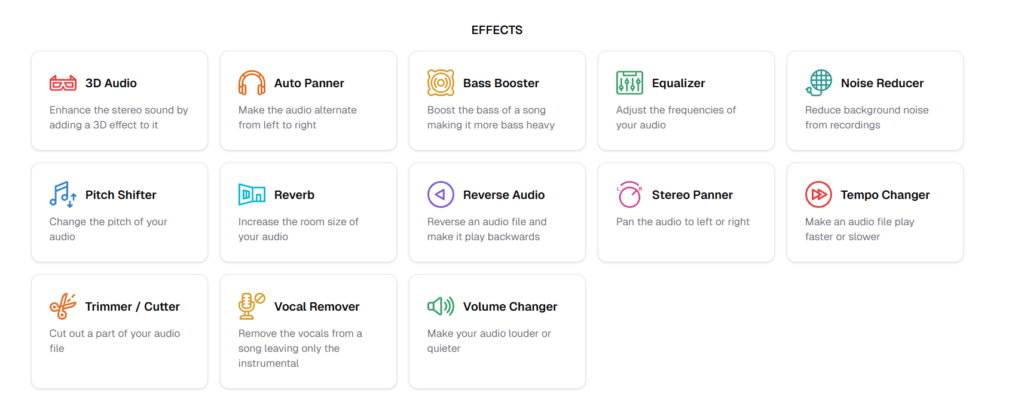
Core Audioalter Effects Detailed Use Cases with Step by Step
Audioalter packs powerful effects that solve 90% of creator audio headaches. Each one explained simply with exact steps, tips, and pro results.
 Noise Reducer Fix Bad Recording Environments Instantly
Most creators record audio at home, in shared spaces, with fans humming, AC buzzing, traffic roaring, or room echo killing clarity. Re-recording wastes hours you need a fix now.
How Audioalter helps?
Audioalter Noise Reducer intelligently strips unwanted background noise while keeping your voice natural and crisp. Drag-and-drop upload, one-click process, download clean audio. This transforms:
• Noisy podcasts into clean episodes
• Traffic-filled tutorials rewritten into focused
• Echoey voiceovers into pro narrations
• Recorded phone calls turned into sharp cuts
Example
Imagine a YouTuber recording a coding tutorial at night voice clear but constant fan noise ruining it.
Without Audioalter: Video feels cheap, viewers comment “too noisy” and bounce.
With Audioalter (takes 60 seconds):
- Go to audioalter.com/noise-reducer
- Upload your MP3/WAV file (under 50MB)
- Click “Reduce Noise” AI analyzes and cleans automatically
- Preview the result (hear the difference instantly)
- Download cleaned file and drop into your video editor
Result: Voice pops forward, focused and professional no re-recording needed. Viewers stay till the end.
Equalizer Make Voices Clear and Pleasant in Seconds
Cheap mics make voices muddy (too boomy), harsh (too sharp), or flat listeners tap away after 30 seconds. Volume boosts don’t fix frequency mess.
How Audioalter helps?
Audioalter Equalizer gives simple sliders to tame lows, boost voice mids (2-5kHz), and sparkle highs. Visual graph shows changes live. Perfect for:
• Long podcasts requiring a cozy tone
• Educational videos featuring straightforward guidance
• Interviews where each word is crucial
• Gameplay commentary that remains clear despite sound effects
Reverb Add Space, Depth, and Emotion Instantly
Dry, flat audio feels lifeless like reading a phone script in a closet. Music disconnects from visuals; voice lacks emotion.
How Audioalter helps?
Audioalter Reverb simulates real spaces (small room to cathedral) with wet/dry mix control. Adds natural reflection without mud. Creators use it to:
• Make bedroom music feel like arena concerts
• Give voice atmospheric presence
• Blend BGM naturally with dialogue
• Create cinematic intros/outros
Auto Panner Add Movement and Stereo Creativity
Static mono/stereo feels boring on headphones (70% of mobile listens). Creators crave dynamic, modern sound that grabs attention.
How Audioalter helps?
Audioalter Auto Panner smoothly swings audio left-right at set speeds creates motion and width. Base for Audioalter 8D. Ideal for:
• Immersive music beds
• Gaming soundscapes
• Motivational video energy
• ASMR spatial effects
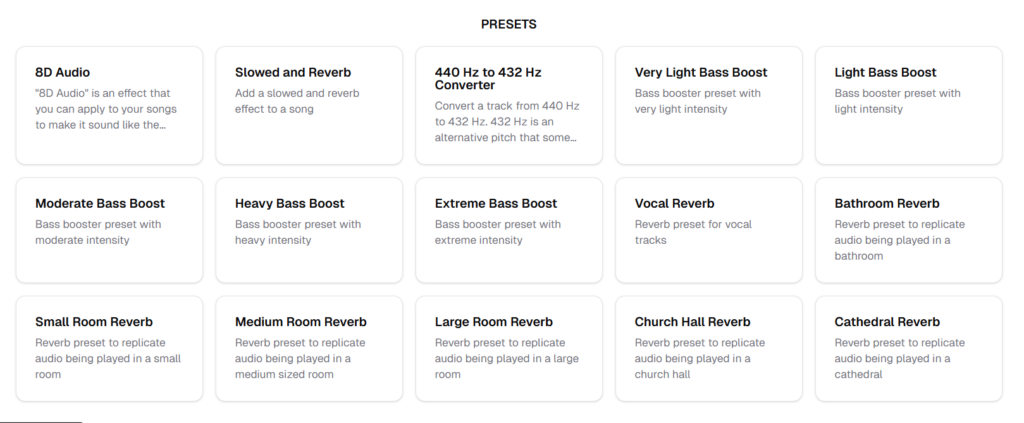
Audioalter Presets Ready Made Solutions for Creators
Audioalter presets = instant pro results, zero knowledge needed. Click, process, done. Here’s every popular one expanded with real creator wins.
 Audioalter 8D Most Searched and Most Popular Feature
What is Audioalter 8D?
Audioalter 8D creates a mind-blowing 3D audio illusion where music feels like it’s spinning 360° around your head vocals swoop from left ear to right, behind you, above, everywhere! It’s not true 8-speaker surround it’s clever stereo trickery using your brain’s natural sound-location cues.
How Audioalter 8D Actually Works (Simple Science)?
Your ears detect sound position by:
• Time difference (left ear hears first = sound on left)
• Volume difference (left louder = left side)
• Frequency changes (head blocks high frequencies from opposite side)
Audioalter 8D hacks this by:
- Auto Panner smoothly rotates sound left→right→left in endless circles (automation, not static pan)
- Reverb adds concert hall depth + echoes bouncing off “virtual walls”
- EQ tweaks mimic head-shadow filtering as sound “moves” around you
Result: Brain thinks band is circling your skull! Only works on headphones (speakers break illusion).
Why creators LOVE Audioalter 8D?
• YouTube views explode 5-10x (add “🎧 HEADPHONES REQUIRED” in title/thumbnails)
• Headphone listeners (80% mobile YouTube) stay 3x longer
• Zero DAW skills faster than Ableton/FL Studio plugins
• Viral on TikTok/Instagram Reels music edits (10M+ “8D” videos)
Step-by-step use case #1: Music Channel Faceless Goldmine
Creator flips trending songs for passive income:
- Grab viral track (Drake, Taylor Swift MP3 under 50MB)
- Hit audioalter.com/preset/8d-audio
- Upload → One-click Audioalter 8D → Preview head-spin effect
- Download → Upload to YouTube: “Drake – God’s Plan (8D Audio) 🎧 Use Headphones”
- Add spinning visuals/trippy backgrounds (free templates)
Result: 10k→100k views overnight, algorithm pushes HARD. One channel hit 1M subs doing only 8D covers.
Step-by-Step Use Case #2: Gaming Stream Overlay
Twitch streamer wants immersive background music:
- Take LoFi beats → Audioalter 8D
- Layer under gameplay (music circles viewer head)
- Add viewer chat reactions
Result: “Bro that music MOVES ” spam, higher bits/subs.
Step-by-step use case #3: Meditation/Relaxation Twist
Wellness creator:
- Take ambient track → Audioalter 8D (slow rotation)
- Title: “8D Rain Sounds for Sleep 432Hz Healing”
Result: Insomniacs loop for hours, top search rankings.
-
Slowed and Reverb Perfect for Reels and Shorts
Fast pop tracks feel too hype for emotional Reels creators need that dreamy, slowed-down vibe trending on TikTok (millions of “slowed + reverb” videos).
How Audioalter helps?
Audioalter Slowed + Reverb preset drops tempo 10-30% while adding perfect hall echo creates haunting, cinematic mood instantly. No timing sync issues. Perfect for:
• Emotional Instagram Reels
• YouTube Shorts storytelling
• TikTok transitions/lip-syncs
• Aesthetic background tracks
-
440 Hz to 432 Hz Converter Calm and Meditation Content
Standard 440 Hz music feels “harsh” to wellness audiences they crave 432 Hz’s warmer, healing tone (huge niche: 10M+ YouTube searches).
How Audioalter helps?
Audioalter converter precisely shifts pitch -0.32 semitones from 440→432 Hz music becomes softer, more grounded without speed change. Wellness creators use it for:
• Yoga flow soundtracks
• Meditation timers
• Sleep story backgrounds
• Spiritual playlist flips
-
Light and Moderate Bass Boost Mobile Friendly Audio
90% listen on phones/tiny speakers music feels thin, no thump, Reels flop without low-end punch.
How Audioalter helps?
Audioalter Light/Moderate Bass presets gently lift 40-200Hz without muddying vocals perfect mobile optimization. Creators use for:
• Daily Reels/Shorts
• Phone-tested social tracks
• Clear vocal + subtle thump
• Podcast intro music
step-by-step example
Reel creator’s chillhop track sounds flat on iPhone speakers.
Applying Light Bass Boost (25 seconds):
- audioalter.com/preset/light-bass-boost
- Upload track
- Select “Light” or “Moderate” preset
- Preview instant fullness
- Export phone-ready audio
Result: Music pops on every device, higher engagement across platforms.
Quick tip: Light = daily safe, Moderate = extra warmth. Always preserve vocal clarity.
Note: Won’t overpower cheap speakers.
-
Heavy and Extreme Bass Boost High Energy Content
Gym videos, car flexes, EDM drops need skull-rattling lows stock tracks disappoint on subwoofers.
How Audioalter helps?
Audioalter Heavy/Extreme presets slam 30-150Hz + harmonics pure energy weapon. Perfect for:
• Workout motivation reels
• Car audio system demos
• EDM festival previews
• Gaming hype montages
Pros and Cons from Real Users
Audioalter scores 8.5/10 from creators:
| Pros | Cons |
| Free forever, browser-only magic | 50MB limit kills long podcasts |
| Audioalter 8D = instant viral | Internet speed = processing speed |
| Beginner-proof one-click fixes | Basic vs. pro DAWs |
| MP3/WAV/FLAC + mobile perfect | Ads during workflow |
When Audioalter is the Best Choice?
Audioalter crushes when you need:
• 5-minute social media audio polish
• Audioalter 8D viral effects
• Beginner noise/bass rescue missions
• Zero-install creative flow
Skip for: Album mastering, 1-hour podcasts, multilayer mixes.
Final Verdict