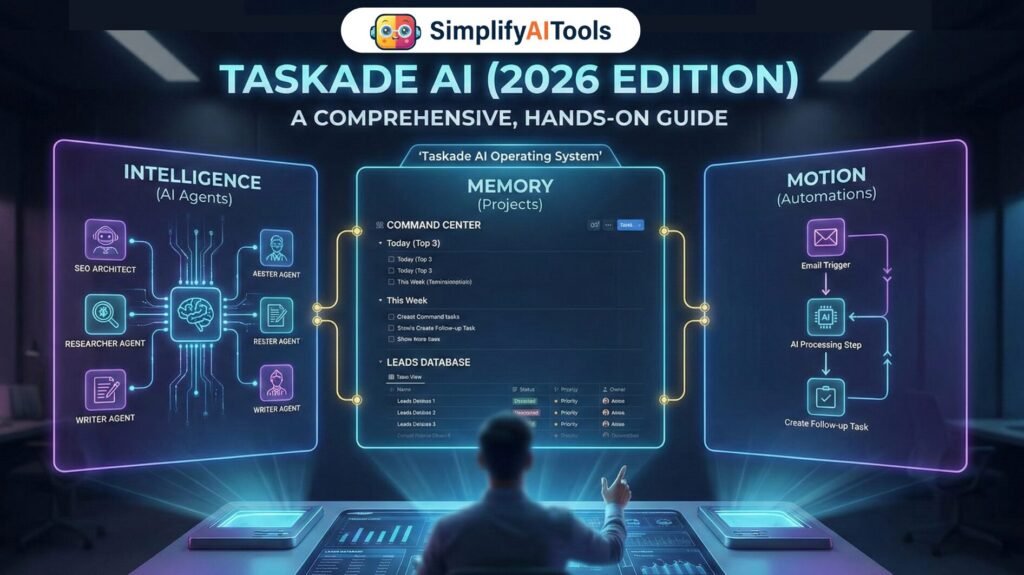
Taskade AI is no longer just a to-do list with a chatbot. Taskade AI is evolving into an AI-native workspace where your projects store real context, your agents apply repeatable intelligence, and your automations keep execution moving even when you are offline. If you have used task apps that only track checklists, Taskade AI feels like the next step: it helps you think, decide, and ship faster.
In this 2026 edition guide, I will show you how Taskade AI works in the real world: how Taskade AI credits impact daily usage, how Taskade AI agents become a reusable digital workforce, and how Taskade AI automations connect your inbox, forms, webhooks, and team updates into one reliable system. Everything here is designed to be hands-on, practical, and easy to replicate.
Taskade AI Quickstart
Most people lose interest in a new productivity tool because the setup feels endless. The fastest way to make Taskade useful is to build a small, repeatable system first, then expand. Here is a simple 20-minute setup that consistently delivers a measurable win within the first week.
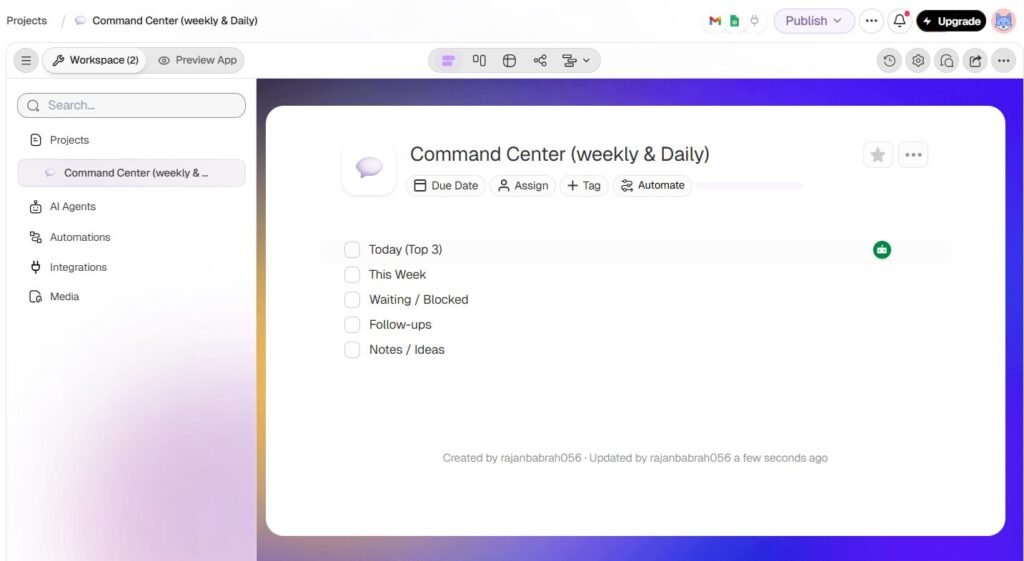
Step 1 — Create your “Command Center” (Free) (5 minutes)
Goal: One place to plan your week + run daily priorities.
- Open Taskade → click + New / Create Project
- Name it: Command Center (Weekly & Daily)
- Choose List view
- Add these 5 permanent sections:
- Today (Top 3)
- This Week
- Waiting / Blocked
- Follow-ups
- Notes / Ideas
Works on Free. This control room stays forever.
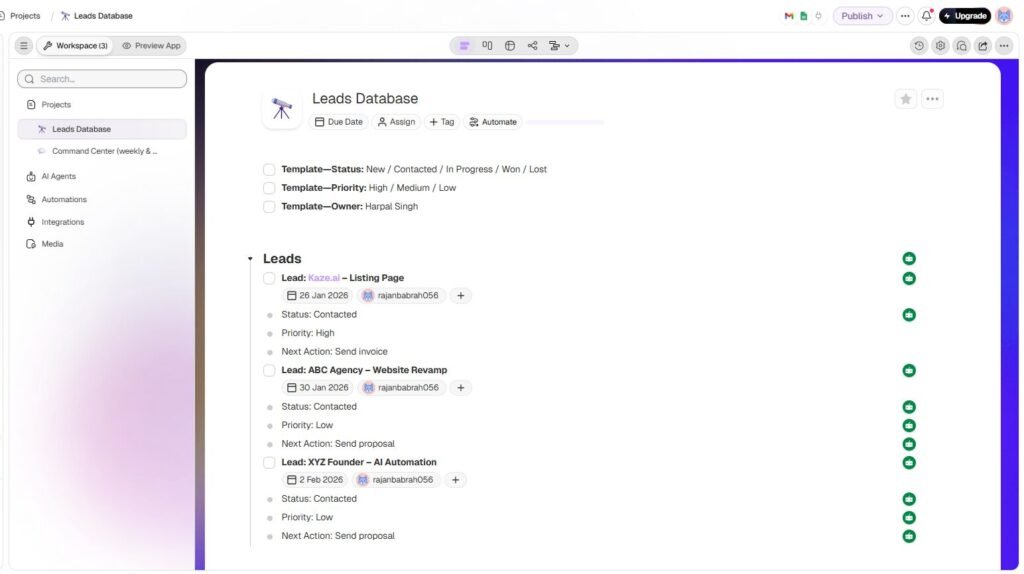
Step 2 — Create ONE “Database Project” (Free) (5–7 minutes)
Goal: Track one main area in a structured way.
Pick only one:
- Leads Database
- Clients Database
- Content Pipeline
- Personal Goals
Free Plan method (works perfectly)
- Each item = one task (Lead/Client/Post)
- Inside each task, use subtasks like:
- Status:
- Priority:
- Next Action:
- Follow-up Date:
- Notes:
Works on Free. No tags/fields needed.
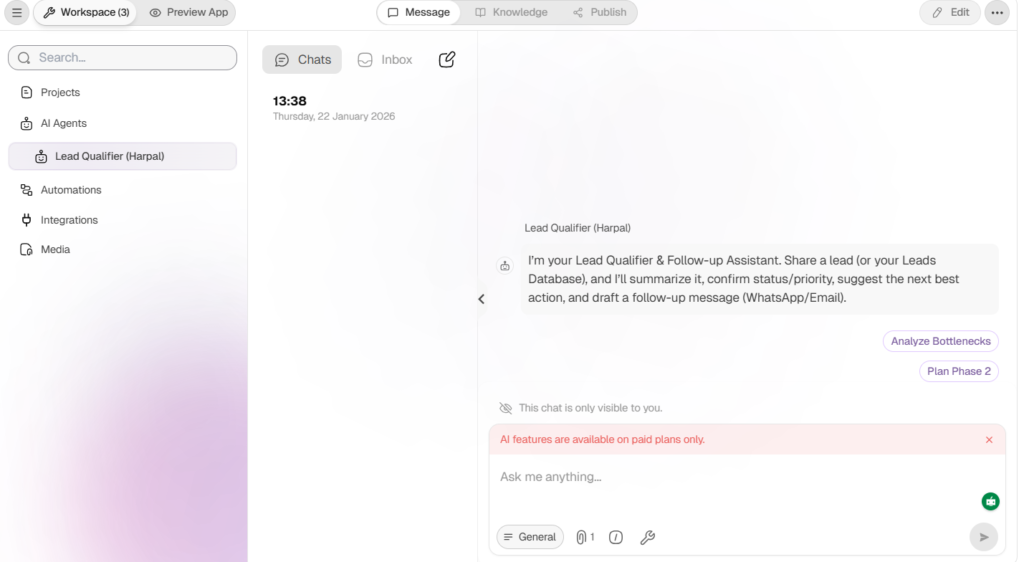
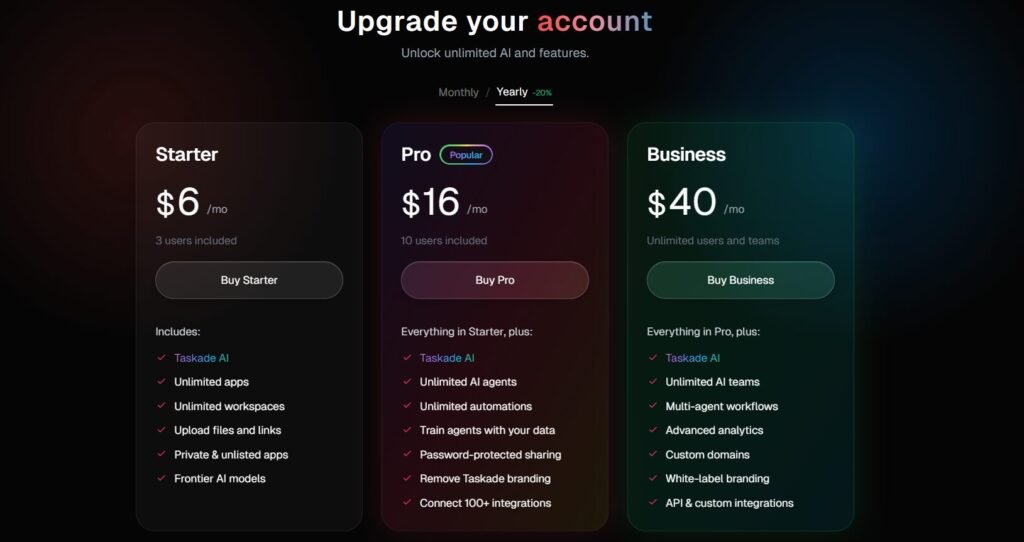
Step 3 — Pro Upgrade: AI Agent (Pro plan required)
What Pro adds: Your “Lead Qualifier” or “PM Auditor” agent can generate:
- Status updates
- Next best actions
- WhatsApp/Email follow-ups
- Weekly summary plans
On Free you do it manually using the template.
On Pro the agent does it automatically.
Pro Plan Required: AI Agents and AI Chat may show “AI features are available on paid plans only.” If you’re on Free, use the manual template method. If you upgrade, the agent can generate follow-ups and summaries instantly.
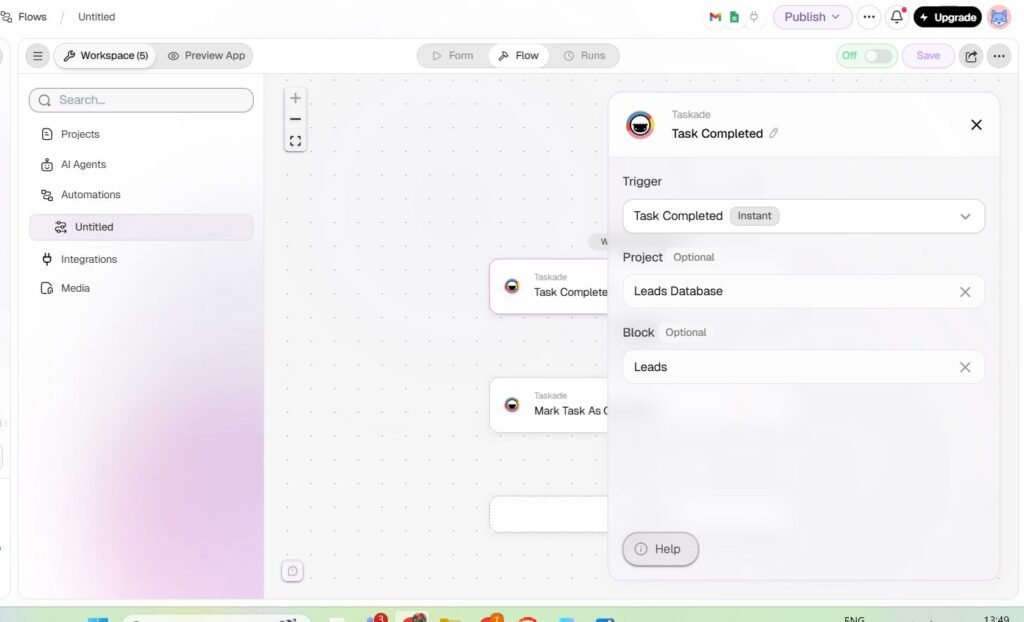
Step 4 — Pro Upgrade: Automation (Pro plan required)
What Pro adds: Automations like:
- Weekly report every Friday → posted into Command Center
- Inbox triage → creates follow-up tasks automatically
- Webhook lead capture → new lead task created instantly
On Free you do weekly review manually.
On Pro you automate it.
Example automation (for blog):
- Trigger: Every Friday
- AI step: Summarize all leads
- Action: Post “Top 5 follow-ups” into Command Center → This Week
Step 5 — Weekly Ritual
Every Friday:
- Review Leads/Clients/Content database
- Pick top priorities for next week
- Move them into Command Center → This Week
- Select Monday’s Top 3
Free: you do it manually
Pro: AI can generate summary + follow-ups automatically
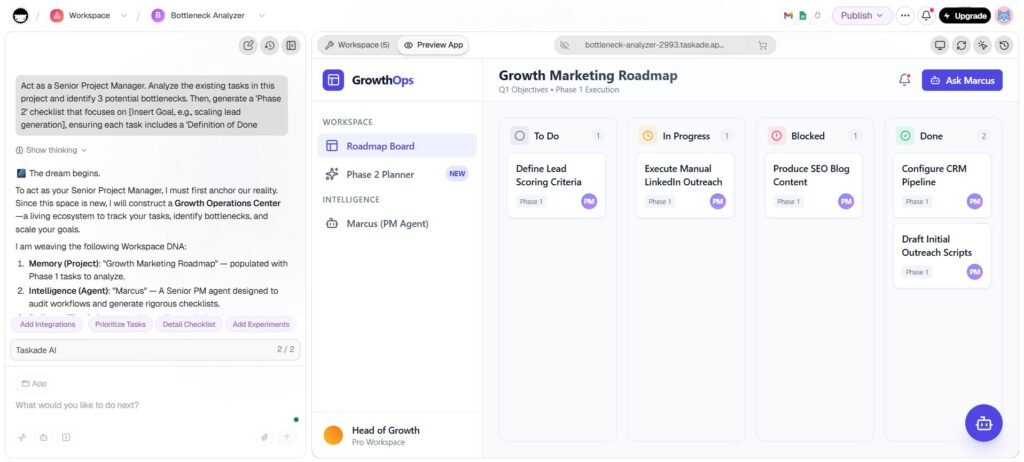
Taskade AI: Memory, Intelligence, Motion
To understand Taskade properly, ignore the marketing labels and focus on the operating model:
- Memory: Your projects hold structured work data (tasks, fields, status, owners, dates).
- Intelligence: Agents and AI chat use that data to summarize, plan, and generate outputs in context.
- Motion: Automations trigger actions (create tasks, notify teams, generate updates) without manual repetition.
Think of it like a small company: projects are your databases, agents are your team members, and automations are your internal processes. When those three pieces are connected, your workflow stops depending on your mood and starts behaving like a system.
Understanding AI Credits: How to Use Them Without Burning Them
Taskade uses an AI credit system. Credits are consumed when you generate content with chat, agents, and automation steps. This matters because the goal is not “use AI more.” The goal is “use AI smarter.”
A practical way to estimate credit burn is to look at output size and complexity. A short summary might cost very little; a long structured report, multi-step plan, or multi-agent chain consumes more. Automations can also consume credits repeatedly if triggers are noisy.
Here are credit-saving habits that genuinely reduce waste:
1) Batch prompts: request summary + tasks + email in a single instruction.
2) Demand strict structure: headings or JSON so you do not spend extra prompts on formatting.
3) Add trigger filters: avoid automations firing on every small update.
4) Use “review mode” prompts: generate once, then refine only the weak sections.
A simple rule I follow: if I need more than two follow-up prompts to “fix” output, the prompt design is wrong. Improve the prompt template, not the output. That change saves credits every single time.
Projects as Databases: The Hidden Upgrade Most Users Miss
The biggest jump in results comes when you stop treating projects as simple lists and start treating them as datasets. A dataset is not “a list of tasks.” A dataset is “work with fields.” Fields make your agent outputs accurate and your automations reliable.
Create one database-style project with fields like:
- Status (Not Started, In Progress, Blocked, Done)
- Priority (Low, Medium, High)
- Owner
- Due date
- Notes / Blockers
Once you do this, you can ask realistic questions like: “Which items are blocked and why?”, “What is overdue?”, “What should I do today for maximum impact?” The workspace becomes queryable.
Creative example: Imagine you run an agency. Instead of a messy WhatsApp thread for each client, you create a single “Client Delivery Database.” Each row is one client. Your agent becomes your project coordinator: it generates weekly status updates, flags risks, and drafts next-step emails.
AI Chat Inside Projects: Your Contextual Brain
Taskade AI chat is most useful when used inside a real project. Instead of pasting context into a chatbot, you ask questions where the work already lives. This turns AI into a decision assistant, not just a text generator.
Below are prompts that consistently produce high-quality results without needing multiple retries.
Prompt 1: Daily Execution Plan (PM-style)
Copy/paste prompt:
“Act as a senior project manager. Review this project and deliver:
1) Top 3 priorities for today (with reasons)
2) Blockers and the exact next action to unblock each
3) Break Priority #1 into 5 subtasks with 30-45 minute estimates
4) A short message I can send to my team/client with status + next steps
Return in clean headings.”
Why it works: it forces prioritization, conversion into subtasks, and ends with a real communication artifact, which is what people actually need.
Prompt 2: Content Topic Mining (from your existing tasks)
Copy/paste prompt:
“Scan this project and propose 12 blog topics that align with my current tasks.
Rank each topic by: Intent (High/Med/Low), Difficulty (High/Med/Low), Business relevance (1-5).
For the top 5 topics, provide:
– 3 headline variations each
– Outline (H2/H3)
– 5 FAQs
– One CTA idea
Keep tone human and practical.”
Creative example: If your project contains tasks like “agent memory,” “webhooks,” “lead capture,” the AI can transform that into publishable topics like “How to Build a Lead Intake Agent That Replies in 2 Minutes” and automatically map tasks into sections.
AI Agents: Building a Reusable Digital Workforce
Agents are where Taskade becomes more than a planning tool. An agent is a reusable specialist with a role, rules, and optional knowledge. The mistake most people make is building an agent that is too generic. A good agent is narrow, repeatable, and strict about output format.
How to Design an Agent That Behaves Consistently
Use this structure:
1) Role: who the agent is (example: “SEO Architect for GenAI tools and AI workflows”).
2) Scope: what it does and does not do.
3) Output rules: headings, bullet lists, and mandatory sections.
4) Workflow: steps it always follows.
5) Quality checklist: clarity, no fluff, no invented metrics, assumptions separated.
Agent Template: SEO Architect for GenAI Blogs
Persona:
“You are my SEO Architect. You write like Harpal Singh: clean, practical, builder-first. Yourself avoid fluff. You prefer step-by-step explanations and real examples. You never invent facts or numbers; if unknown, mark as assumption.”
Default output format (mandatory sections):
1) Best angle (why this topic matters)
2) Titles (5)
3) Target keywords (primary + secondary)
4) Outline (H2/H3)
5) Examples (at least 3)
6) FAQs (5)
7) CTA ideas (3)
8) Internal linking suggestions
Test prompt:
“Create a 2,000-word structure for ‘Building AI Agents for Business Ops in 2026’. Include a practical workflow, tool stack examples, and a common mistakes section.”
What you get: a publish-ready blueprint that already matches your tone, and you can reuse the template again and again.
Multi-Agent Teams: When Taskade Starts Scaling
When you move from one agent to multiple specialized agents, you can split work the same way a real team does. This reduces output drift and improves quality.
A simple and highly effective chain for content production is:
• Researcher Agent: collects structure, key points, examples
• Writer Agent: drafts sections in your tone
• Editor Agent: removes fluff, improves clarity, adds transitions
• Publisher Agent: creates checklist, CTA, social snippets, and posting plan
Creative example: For a product launch, the Researcher agent extracts what changed, the Writer agent drafts the announcement, the Editor agent shortens it for LinkedIn, and the Publisher agent generates 10 caption variations.
Automations: The System That Runs While You Sleep
Automations are where you stop doing repetitive work manually. Think of an automation as a recipe: a trigger happens, AI processes information, and actions happen reliably.
The difference between a good automation and a bad automation is noise. A good automation triggers only when it should and produces outputs in a strict format.
Automation 1: Weekly Status Report (Safe, High ROI)
Trigger: every Friday.
AI step: summarize wins, blockers, and next steps.
Action: post the report in your Command Center project.
AI prompt (copy/paste):
“Create a weekly status update from this project.
Format:
1) Wins (3 bullets)
2) Blockers (each with owner + next action)
3) Next week priorities (5 bullets)
Limit to 180-220 words.”
Automation 2: Smart Inbox Triage (Client-ready)
Trigger: email arrives with labels/keywords like “proposal”, “invoice”, “urgent”.
AI step: extract intent, urgency, deadline, action items, and draft a reply.
Action: create a task in the correct project and notify you.
AI prompt (structured JSON, copy/paste):
“Read the email and return JSON with fields:
{
category,
urgency,
deadline,
summary,
action_items: [..],
suggested_reply
}
Do not add any extra text outside JSON.”
Automation 3: Webhook Lead Intake (For Builders)
If you run a website, you can send leads to Taskade via webhook. The automation receives structured fields (name, email, service, budget), then AI qualifies the lead and creates a task.
Example webhook payload:
{
“name”: “Amit”,
“email”: “amit@domain.com”,
“service”: “AI Agents & Automation”,
“budget”: “INR 100000”,
“notes”: “Need a lead triage workflow”
}
AI prompt:
“Classify this lead as Hot/Warm/Cold.
Explain why in one line.
Draft a reply email in a professional tone.
Create a next-step checklist with 3 tasks.”
Mind Maps and Visual Planning: Turning Chaos into Clarity
Taskade’s multi-view approach is practical: list for execution, board for pipeline, calendar for scheduling, mind map for thinking. The mind map view becomes powerful when paired with AI expansion.
Workflow:
1) Brain dump in a list
2) Convert to mind map
3) Run AI Expand to add missing branches
4) Convert back into tasks with owners and due dates
AI Expand prompt:
“Expand this map into a complete workflow. Add missing steps, risks, and KPIs. Keep it practical and action-driven.”
Creative example: If your central node is “Content Pipeline,” AI can add branches like Research, Drafting, Editing, SEO, Publishing, Repurposing, and Analytics, then add concrete steps under each branch.
Taskade vs Notion vs ClickUp vs Motion: A Builder’s Quick Comparison
If you are choosing between tools, here is a practical positioning summary:
- Taskade: strongest for agents and automations inside projects, lightweight and fast.
- Notion: strongest for documentation and deep database pages, heavier execution layer.
- ClickUp: strongest for heavy PM features, but complexity can slow adoption.
- Motion: strongest for scheduling, but less of a full workspace system.
A useful hybrid approach is also possible: keep Notion as a documentation wiki, and use Taskade for execution + automation where agents do real work.
Common Mistakes and Fixes (Real-World)
Mistake 1: Messy task titles and no ownership.
Fix: Use verb-first task titles, assign one owner, and keep status consistent.
Mistake 2: Agents with vague roles.
Fix: Narrow the role and lock the output format; add a quality checklist.
Mistake 3: Noisy automations.
Fix: Add filters, schedules, and strict JSON outputs to reduce rework.
Mistake 4: Treating AI output as final.
Fix: Use AI as a draft accelerator; always run a final human review pass.
Who Should Use Taskade (and Who Should Skip It)?
Use Taskade if you want one workspace where planning, Simplify AI Tools, AI generation, and automations all live together. It is especially strong for creators, freelancers, agencies, and builders who want repeatable workflows.
Skip or delay if you need enterprise-grade permission complexity on day one, or if your workflow does not benefit from AI and automation.
Final Take: Build a Taskade Operating System
The best way to get results is to build Taskade as an operating system:
1) Memory: one database-style project with clean fields
2) Intelligence: 2-3 core agents you reuse everywhere
3) Motion: 1-2 automations that remove repetitive work
4) Review loop: weekly audit + weekly plan
Start small, prove value, then scale. Once your workspace is structured, Taskade becomes the place where work moves forward automatically not a place where work goes to die.