Day 1: What Is Generative AI? A Beginner Friendly Guide for Everyone in 2025
What Is Generative AI? We break it down simply: it’s not magic, it’s pattern recognition. Discover how tools like ChatGPT work, why they hallucinate, and how to start using them to save time today...
A simple breakdown of Generative AI: what it is, how it works, and why it’s transforming everyday work in 2025.
If you’re new to AI, or you’ve only seen “Generative AI” trending everywhere, you might be wondering:
- So what is Generative AI and why did it become so popular so fast?
- How does it write, draw or code in a flash?
- So how then will all this affect your job, studies or career?
Everything is answered in plain English in this blog. No math, no jargon. No PhD required.
Welcome to Day 1 of our 7-Day GenAI Crash Course.
Generative AI: The Simplest Explanation
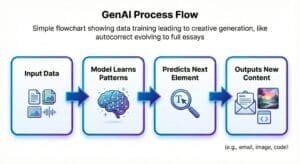
Generative AI works like a smarter autocorrect. Rather than guessing your next word, it can generate complete text, pictures, music, and more. Here’s the basic idea: you give it some input, the model digs through everything it learned during training, finds patterns, predicts what comes next, and then creates something new. That’s how you end up with a fresh paragraph, a new image, a chunk of codewh atever you asked for.
A simple flowchart showing how data training leads to creative generation basically autocorrect evolving into full essays.
Think of it as “Autocorrect on Steroids”
Your phone predicts “How are you doing?” from “How are you”. GenAI takes that same idea and scales it to full stories, essays, code, or artwork by mastering context, grammar, logic, and structure from billions of examples.
It does not “think” like a human
It doesn’t act on emotion or “know” facts the way we do. Instead, it predicts probabilities. It guesses the next word, sentence, or pixel based on everything it has ever seen.
Over time, patterns emerge question formats, coding syntax, storytelling shapes. The result? Outputs that feel smart, fluent, and human-like.
Does Generative AI Really Understand You?
Short answer: No. But it acts like it does.
GenAI is not emotional, conscious, or self-aware. It simply:
- Spots patterns
- Follows instructions
- Adapts to context
- Predicts the most likely next response
It feels like understanding but it’s pattern mastery, not human intuition.
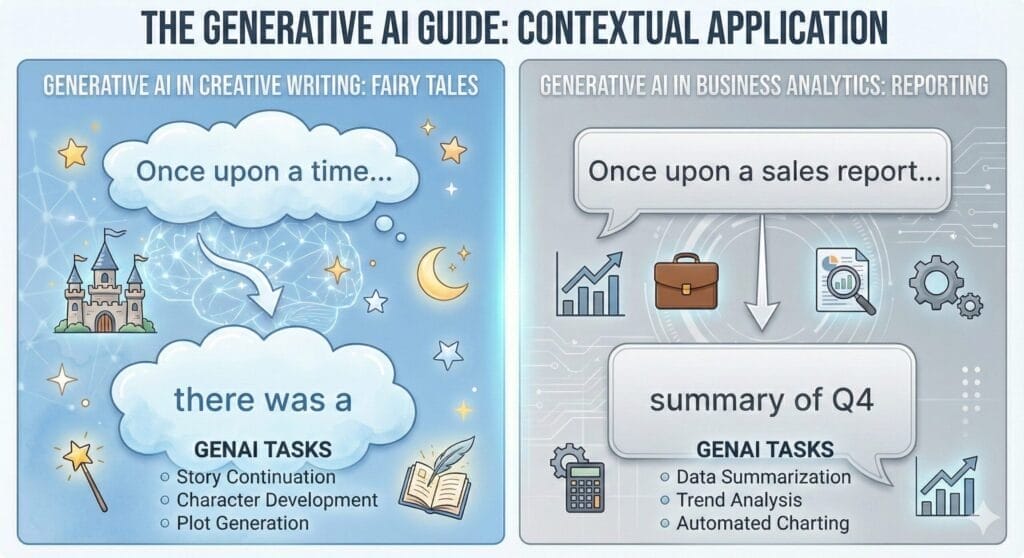
- “Once upon a time…” → predicts “there was a” (Fairy Tale Pattern)
- “Once upon a sales report…” → predicts “summary of Q4” (Business Pattern)
Description: Side-by-side boxes showing how the model shifts context without actually “thinking.”
This is why ChatGPT can switch tones instantly: A fairy tale becomes a business analysis just because the context changed.
GenAI = A super-fast pattern engine that produces human-like responses.
Why the 2022–2025 Explosion?
Generative AI existed long before 2022. But to go mainstream, it needed a perfect storm of three things:
- Huge GPU Clusters: Massive computing power to process information.
- Complex Engineering: New model architectures (Transformers).
- Massive Datasets: Access to nearly the entire public internet to learn from.
Tools like ChatGPT, Gemini, Claude, and Midjourney changed everything by making this technology instant, accessible, and free.
Suddenly, non-tech users could write emails, brainstorm ideas, summarize PDFs, create graphics, and debug code. This moved AI from research labs to daily life. By 2025, it’s inside almost every app we use.
How You Already Use Generative AI Daily
Even if you never opened ChatGPT, you’ve likely used GenAI features embedded in your favorite apps:
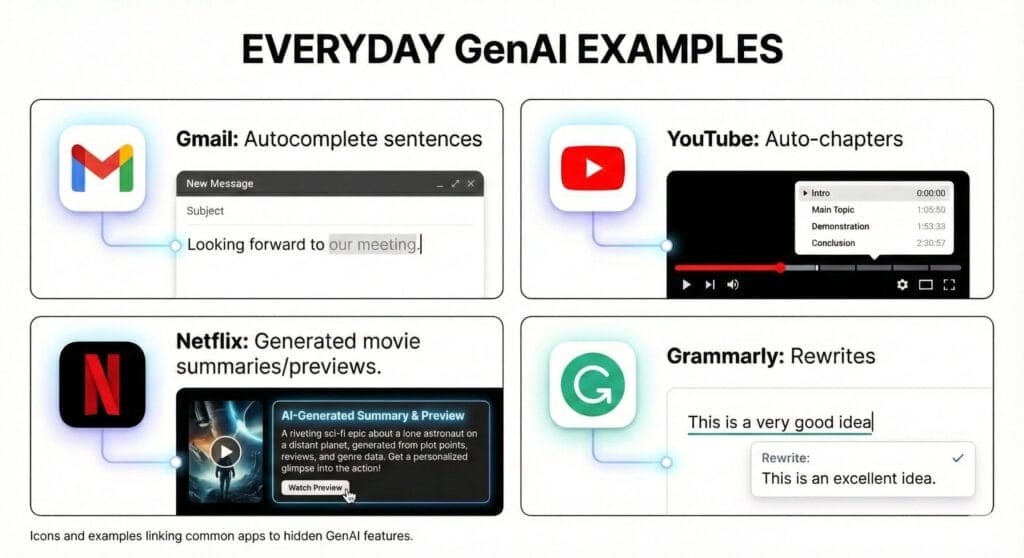
- Gmail: “Help Me Write” (Drafting entire emails)
- Spotify: AI DJ (Generates voice commentary between songs)
- Grammarly: Rewriting sentences for tone/clarity
- Zoom/Teams: Auto-generated meeting summaries
Description: Icons in a grid showing hidden GenAI features powering everyday apps.
GenAI is everywhere quietly speeding up your day.
GenAI in Offices and Enterprises
Companies are not using GenAI for fun they’re using it to save time, reduce workload, and scale operations. Here are real examples:
| Use Case | Example | Time Saved |
| Customer Support | Auto-drafting replies to complex FAQs | 50% workload drop |
| Documents | Summarizing 50-page PDF reports | Hours per report |
| Compliance | Extracting data from ID cards (KYC) | Faster audits |
| Marketing | Generating blog outlines and ad copy | Daily content scale |
Visual bar chart comparing manual vs GenAI workflows.
Enterprises love it because it allows them to scale without burnout.
Traditional AI vs. Generative AI
| Traditional AI | Generative AI |
| Predicts or Classifies | Creates New Content |
| Rules-based | Pattern-based |
| Narrow focus | Flexible and creative |
| Example: Spam filter, Credit Score | Example: Writing emails, Generating images |
Traditional AI = “Is this email spam?”
Generative AI = “Write a reply to this email.”
Jobs: Replace or Augment?
GenAI replaces tasks, not jobs.
It automates the boring stuff: data entry, basic drafting, formatting, and summarizing.
But it augments the human stuff: strategy, creativity, judgment, and decision-making.
The future belongs to people who learn to use AI as a tool, not fear it. Curiosity is your strongest skill.
Start with GenAI Today (5 Beginner Steps)
Here’s the easiest path to get started without getting overwhelmed:
- Get Good at Prompting: Don’t settle for basic questions. Give the AI some real context. Say, “Write a polite email to my boss asking for leave because I have a family wedding,” instead of just, “Write an email.” It makes a world of difference.
- Summarize Documents: Got a long PDF? Upload it to ChatGPT or Gemini and say, “Give me the top 3 bullet points from this file.” That’s it. Let the AI do the heavy lifting.
- Compare Models Side by Side: Ask ChatGPT and Gemini the same question. Notice how each one responds. Find out which one clicks with you.
- Build a Quick Project: Ask the AI to “Create a 3-day travel itinerary for Paris with a budget of $1000.”
- Join Communities: Follow creators on LinkedIn or Reddit to see how others are using it.
No degree or coding needed. Just curiosity.
Your Day 1 Challenge
Don’t just read do. Go to ChatGPT or Gemini right now and type this prompt:
“Explain my job [insert your job title] to me as if I were a character in a sci-fi movie.”
See how it recognizes the pattern of your job and the pattern of sci-fi, and blends them? That is Generative AI in action.
Tomorrow: Day 2 — Language Models, The Brains Behind GenAI
Follow this 7-Day series and drop your biggest GenAI question in the comments. I might answer it in the next posts.

Disclaimer: Views are the author’s own. Content is informational only.
Was this article helpful?
A quick vote helps us improve the guides readers find most useful.
Join the discussion
Share your experience, ask a question, or add something useful for other readers.