MailerLite: What It Is, Why You Need It, and a Step by Step Guide to Using MailerLite (2026)
Email marketing has stayed powerful in 2026 for one simple reason: it is one of the few channels you truly own. Social reach can drop overnight, ad costs fluctuate, and platforms keep changing rules...

Email marketing has stayed powerful in 2026 for one simple reason: it is one of the few channels you truly own. Social reach can drop overnight, ad costs fluctuate, and platforms keep changing rules. But a quality email list remains a direct line to your audience and your customers. That is why MailerLite continues to be a popular choice for creators, startups, agencies, ecommerce stores, and service businesses that want predictable growth.
MailerLite is an email marketing platform that helps you collect subscribers, send newsletters, build automated email journeys, and convert subscribers into customers using landing pages and signup forms. It is designed for people who want a clean workflow without needing a full-time technical team.
If you are building a modern marketing stack, you will also notice that many teams shortlist MailerLite through Simplify AI Tools because it helps compare tools by use case rather than hype. For example, if you want the tool page, pricing context, and quick summary in one place, you can check MailerLite on Simplify AI Tools. That is often the fastest way to decide whether MailerLite fits your needs before going deep.
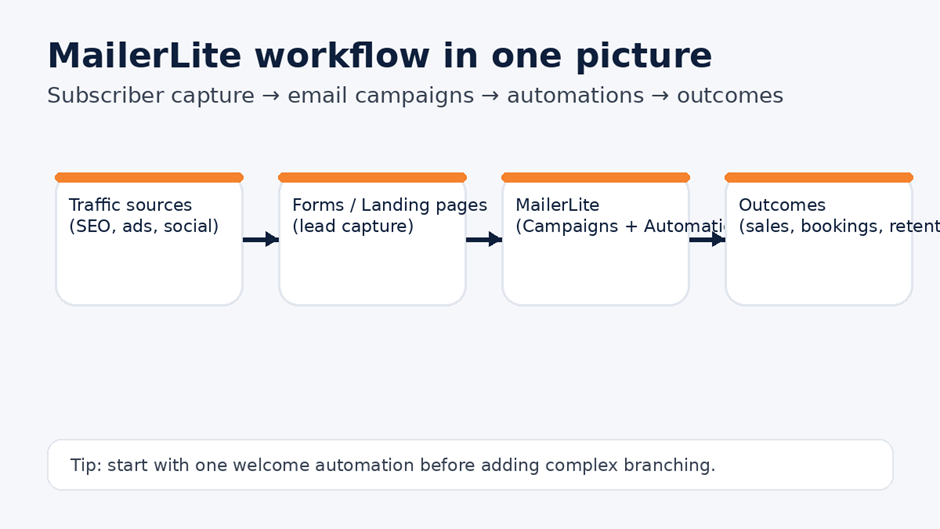
Caption: A simple MailerLite workflow: traffic → lead capture → campaigns and automation → outcomes.
What is MailerLite?
MailerLite is a platform for email marketing and subscriber growth. It gives you the tools to run three core activities:
First, you can create and send email campaigns like newsletters and product updates. Second, you can build automations such as welcome sequences, onboarding journeys, lead nurturing flows, and post-purchase emails. Third, you can grow your list using signup forms and landing pages that connect directly to your subscriber database.
If you want the official overview of what the platform includes, MailerLite’s feature pages explain how email campaigns, forms, landing pages, and automation workflows work together in one system. A good starting reference is MailerLite email marketing features.
Why do you need MailerLite in 2026?
A lot of businesses are not losing growth because their offer is weak. They lose growth because follow-up is inconsistent. Someone visits your website today and leaves or if downloads a free resource and never hears from you again. Someone buys once and does not return. Email automation fixes that gap by turning “one-time events” into repeatable sequences.
MailerLite helps because it gives you a system that can run daily without extra effort. Once you set up a welcome sequence, it sends automatically or if you connect a landing page to a group, subscribers flow in automatically. Once you segment your list, each audience receives more relevant emails, which improves opens, clicks, and conversions over time.
MailerLite also fits well in a broader growth stack where AI Tools are used for drafting copy, building outlines, repurposing content, and speeding up execution. For example, many teams combine MailerLite with writing-focused tools like TextCortex AI when they need faster newsletter drafting and cleaner tone control. That combination works well because MailerLite runs the delivery and automation, while AI Tools speed up the creation side.
What MailerLite helps you do in real business terms?
MailerLite is not just “send emails.” The practical value shows up as workflow improvements.
When you are a creator, it helps you build a list and sell products consistently.
If a service business, it helps you nurture leads and book calls.
For an ecommerce, it helps you run post-purchase journeys and retention campaigns.
If you are an agency, it helps you set up client workflows quickly and manage segments cleanly.
MailerLite also integrates with common business platforms so it can connect to your website and tools. If you want to see the integration ecosystem in one place, here is the official reference: MailerLite integrations.
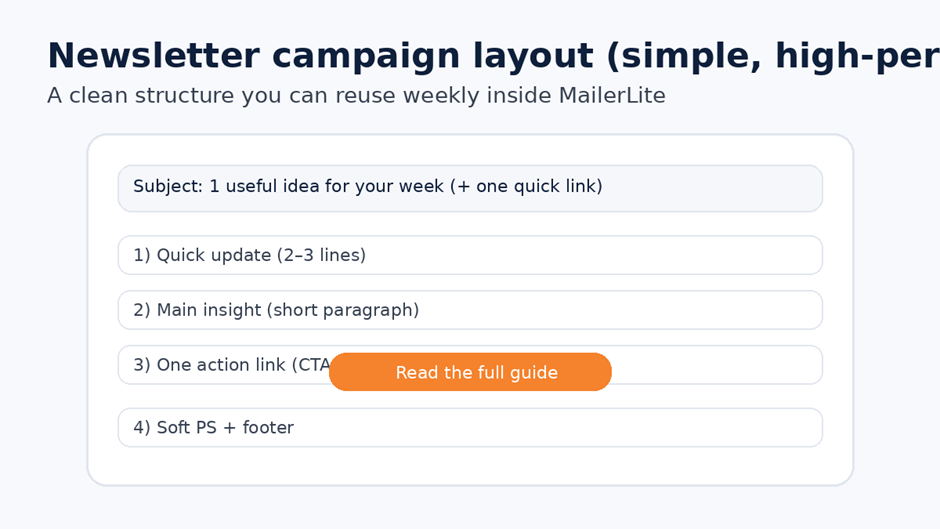
Caption: A simple newsletter structure that works well for weekly content and promotional updates.
Step-by-step guide to using MailerLite (beginner to working system)
This section is written so that you can follow it in a straight line. The goal is simple: by the end, you will have a signup method, a subscriber group, one newsletter format, and one working automation.
Step 1: Create your account and complete the basic setup
Start by signing up and entering your sender details properly. Use a business email where possible, and make sure your sender name is consistent. A small detail like sender consistency helps build trust and improves long-term deliverability.
Once you are in the dashboard, set a simple visual identity. Even if you keep it minimal, it is worth adding your logo and default footer details early so your emails look professional.
Step 2: Decide how you will organize subscribers
MailerLite gives you practical ways to organize your audience: groups, segments, and custom fields. You do not need complex structures on day one, but you should avoid mixing everything into one unstructured list.
A clean starting structure is:
- One main group for newsletter subscribers
- One group for leads from a specific offer (like a checklist or webinar)
- Optional segment rules later (based on behavior)
Custom fields matter because they enable personalization. Even a basic first-name field helps. If you plan to collect different lead sources (blog, WhatsApp, ads), a “source” field is useful for tracking.
Step 3: Create a signup form and connect it to your group
If you already have website traffic, this is your biggest win. Create an embedded form or popup, then connect it to a group so subscribers are automatically categorized.
Keep the form simple at first: email + first name is enough. You can always enrich data later. Forms convert better when the promise is clear, like “weekly tips” or “free guide.”
Step 4: Build a landing page if you want focused conversion
If you are running ads, promoting a lead magnet, or offering a webinar, a landing page often converts better than sending people to a homepage. A landing page removes distractions and keeps one clear call-to-action.
Keep your landing page structure simple:
- A headline that states the benefit
- A short explanation of what the visitor will get
- One form and one CTA
- A small trust line (no spam, unsubscribe anytime)
Step 5: Create your first newsletter campaign
A newsletter campaign is a one-time send. Start with a basic format you can reuse every week. That is how newsletters become easy rather than stressful.
A high-performing structure is:
- One main idea
- One useful insight or example
- One action link
- A short closing line
If you want to draft your first few newsletters faster, this is a great place to combine MailerLite with AI Tools. You can write raw thoughts, then use a writing assistant to improve clarity and tone, then paste the final into MailerLite.
Step 6: Create your first automation (welcome sequence)
Automations are where MailerLite becomes a “system,” not just an email sender.
Your best first automation is a 3-email welcome sequence:
- Email 1 delivers the promised resource and sets expectations
- Email 2 provides a quick win or framework
- Email 3 suggests a next step, softly, without hard selling
MailerLite provides an official guide for creating automation workflows, and it is useful if you want to match the exact interface steps inside their automation builder. Here is the reference: How to create an automation workflow in MailerLite.
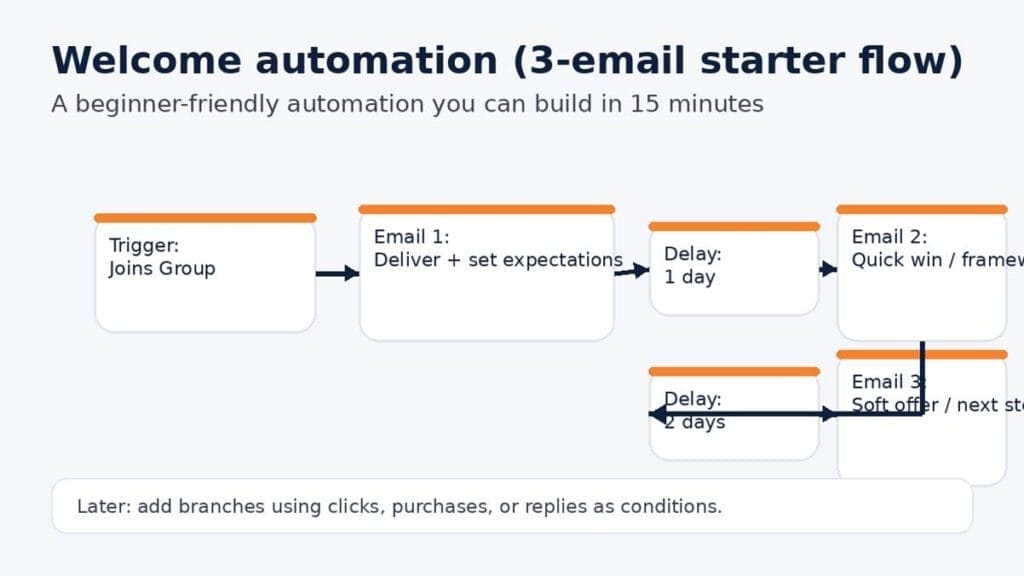
Caption: A simple 3-email welcome automation flow you can build quickly and improve over time.
Step 7: Add segmentation and personalization when the basics work
Once your welcome automation is running smoothly, you can improve relevance. This is where you add segmentation rules like:
- Engaged users (opened last 30 days)
- Clicked pricing link
- Downloaded a specific lead magnet
Do not build complex logic too early. Let your list grow first, then segment based on real behavior. The main goal is to increase relevance, not complexity.
Step 8: Connect MailerLite to the rest of your business tools
MailerLite becomes much more powerful when it updates automatically based on actions in other tools. For ecommerce, purchases can trigger post-purchase sequences. If you have service businesses, booking a call can trigger a reminder and follow-up flow. For agencies, leads can be tagged and routed.
A connected stack helps reduce manual work. Some businesses even combine outreach systems with email marketing workflows. If your workflow includes outbound lead generation, you might also explore tools like Smartlead for cold outreach workflows while keeping MailerLite for newsletters and nurturing. That separation is important because outreach and newsletter marketing have different deliverability requirements and list rules.
Common mistakes beginners make with MailerLite
One common mistake is collecting emails without a clear promise. People subscribe when they know what they will get. Another mistake is asking too many form fields too early, which reduces signups. A third mistake is sending only promotional emails. Lists become inactive when they do not receive value. A fourth mistake is ignoring automation, even though automation is the biggest advantage of tools like MailerLite.
MailerLite works best when you use it consistently. A weekly newsletter plus a simple welcome automation is already enough to build momentum. Once that system is stable, you can build deeper sequences and more advanced segmentation.
Final thoughts
MailerLite is a practical email marketing platform because it combines the essentials: campaigns, automation workflows, signup forms, landing pages, and integrations. If you want an email system that does not require a big team, it is a strong option.
Else when you are building your growth stack in 2026, it also helps to treat email marketing as part of a broader workflow that includes AI Tools for drafting, repurposing, and speeding up execution. Also if someone wants a place to compare tools by category and build an intentional stack, Simplify AI Tools is a useful discovery layer.

Disclaimer: Views are the author’s own. Content is informational only.
Was this article helpful?
A quick vote helps us improve the guides readers find most useful.
Join the discussion
Share your experience, ask a question, or add something useful for other readers.